

Unlock the Secret to Effortlessly Connecting CarPlay to Your Mercedes!
In today’s fast-paced world, staying connected while on the road is more important than ever. For Mercedes owners, integrating technology seamlessly into your driving experience is a top priority. Enter CarPlay—a revolutionary feature that allows you to use your iPhone in a smarter way while driving. With CarPlay, you can access your favorite apps for navigation, music, and communication directly through your car’s infotainment system. This not only enhances convenience but also promotes safer driving. Imagine navigating through city streets with ease, listening to your favorite playlists, or making hands-free calls without distraction. The benefits of connectivity in modern vehicles are undeniable, and with CarPlay, you can unlock a new level of driving enjoyment in your Mercedes.
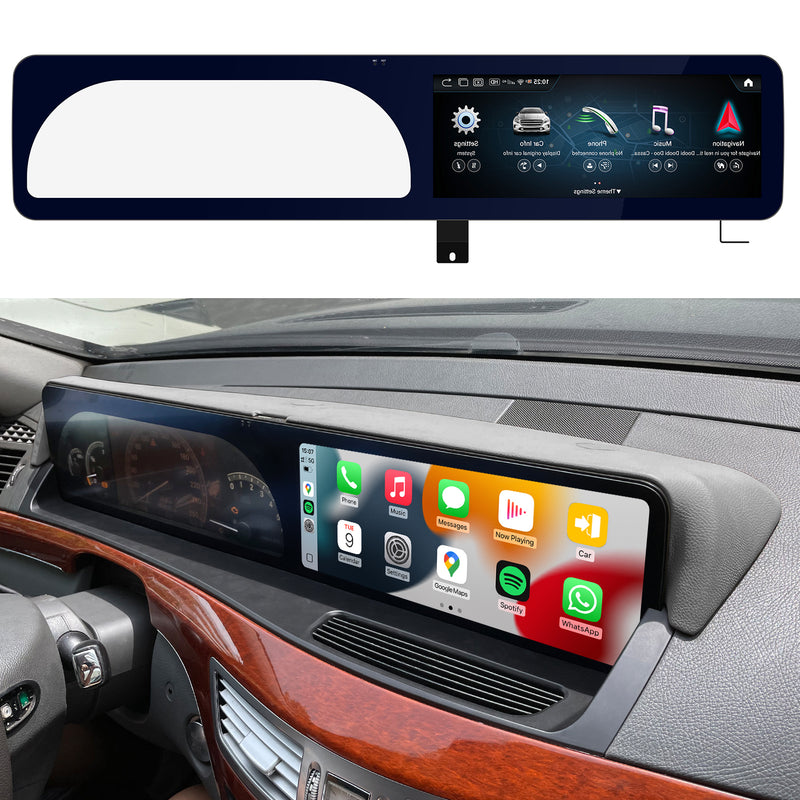
Understanding CarPlay and Compatibility with Mercedes
CarPlay is Apple’s innovative in-car interface that allows you to connect your iPhone to your vehicle, transforming your driving experience. It integrates your phone’s functionalities into the car’s infotainment system, providing easy access to your apps. However, not all Mercedes models come with CarPlay compatibility out of the box. Typically, newer models from the last few years have built-in support for CarPlay, while older models may require an upgrade or additional hardware. To check if your specific model supports CarPlay, refer to your user manual or the manufacturer's website. Additionally, ensure that your iPhone is updated to the latest iOS version, as this is crucial for compatibility. Understanding your vehicle’s compatibility is the first step towards enjoying the benefits of CarPlay.
Step-by-Step Guide to Connecting CarPlay to Your Mercedes
Connecting CarPlay to your Mercedes can be a straightforward process, whether you prefer a wired or wireless connection. Here’s a step-by-step guide to help you get started:
- Wired Connection: Use a USB cable to connect your iPhone to the USB port in your Mercedes. The port is usually located in the center console or dashboard. Once connected, your car should automatically recognize the device, and CarPlay will launch on the infotainment screen.
- Wireless Connection: For models equipped with wireless CarPlay, ensure that Bluetooth and Wi-Fi are enabled on your iPhone. Start your vehicle and put it in park. On your iPhone, go to Settings > General > CarPlay and select your car. Follow the on-screen prompts to complete the pairing process.
- Using Siri: Once connected, you can activate Siri by pressing the voice control button on your steering wheel or by saying "Hey Siri." This allows for hands-free operation of your apps.
- Troubleshooting: If CarPlay doesn’t connect, ensure that your iPhone is unlocked and that you’ve allowed CarPlay access while your phone is locked. Restart your iPhone and vehicle if necessary.
By following these steps, you should be able to connect CarPlay to your Mercedes effortlessly. If you encounter any issues, refer to your vehicle's manual for specific instructions or troubleshooting tips.
Essential Products and Services to Enhance Your CarPlay Experience
To maximize your CarPlay experience, consider exploring various products and services designed to enhance connectivity and functionality. One essential accessory is a high-quality USB cable, which can ensure a stable wired connection. If your vehicle lacks wireless CarPlay support, a compatible adapter may bridge that gap, allowing you to enjoy the convenience of a wireless connection. Additionally, there are numerous apps available that can enhance your CarPlay experience, from navigation tools that provide real-time traffic updates to music streaming services that offer vast libraries of songs. For those looking for a more integrated solution, professional installation services can help set up additional features or troubleshoot existing systems. Investing in these products and services can significantly enhance how you use CarPlay in your Mercedes.
Troubleshooting Common Connection Issues
While connecting CarPlay to your Mercedes is generally a smooth process, users may occasionally encounter issues. One common problem is the device not being recognized, which can often be resolved by checking the cable connection or ensuring that your iPhone is unlocked. If the CarPlay icon does not appear on the infotainment screen, ensure that your vehicle’s software is up to date and that CarPlay is enabled in your phone settings. Additionally, if you experience lag or disconnections during use, consider restarting both your iPhone and the vehicle's infotainment system. Documenting these common issues and their solutions can save time and frustration, allowing you to enjoy a seamless driving experience.
Maximizing Your CarPlay Experience in Mercedes
Connecting CarPlay to your Mercedes opens up a new world of convenience and functionality, enhancing your driving experience. By understanding the compatibility of your vehicle, following the steps for connection, and utilizing essential products and services, you can make the most out of this feature. Whether it's for navigation, music, or communication, CarPlay allows you to stay connected while keeping your focus on the road. Don’t hesitate to explore all the connectivity features your Mercedes has to offer; the journey is just as important as the destination!